A guide to uploading lists in HubSpot Before You Begin Please ensure your file is saved in one of...
Review Email Recipients and Set Marketing Contacts Before Sending
There are many ways to make sure your segment's contacts are set to Marketing Contacts in HubSpot, but the best way for us is to do it through the marketing email tool, under Review. From there, we can review the recipients and set eligible contacts as Marketing Contacts.
The main reason we prefer this approach is that our lists may contain hard-bounced contacts, invalid email addresses, or other problematic records. We want to identify and manage these contacts before sending rather than automatically turning everyone in the segment into a Marketing Contact.
We've established an internal campaign called Better Data to maintain the quantity and the quality in our HubSpot. This helps us maintain a clean contact database, protect our email deliverability, and avoid unnecessarily increasing our Marketing Contact count.
Step 1: Open Your Marketing Email
-
Log in to HubSpot.
-
Navigate to Marketing → Email.
-
Open the marketing email you have drafted.
-
Navigate to the Send or Schedule section.
-
Select the segment/ list you want to send the email to under the recipient settings.
-
Double-check that you have selected the correct segment.
- Important: Add Hard bounced - Active List and Unsubscribed Emails - Active List to the Don't send to section.
Step 2: Review Your Recipients
-
Once your segment has been selected, navigate to the Send/Review section of the email setup.
-
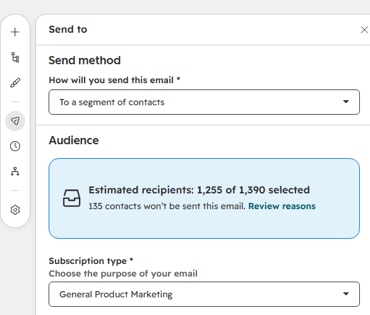
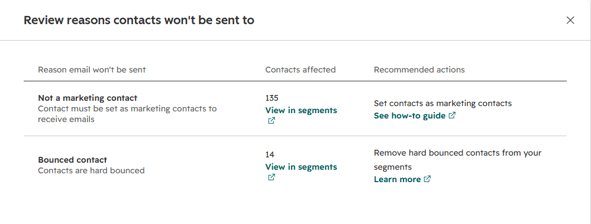
Select 'Review reasons', to review the recipient information and look for any notifications or warnings about contacts who cannot receive the email.
-
Pay attention to contacts who are currently Non-Marketing Contacts.
.
-
In the Not a marketing contact section, Select the option 'View in segments', before making any changes.
-
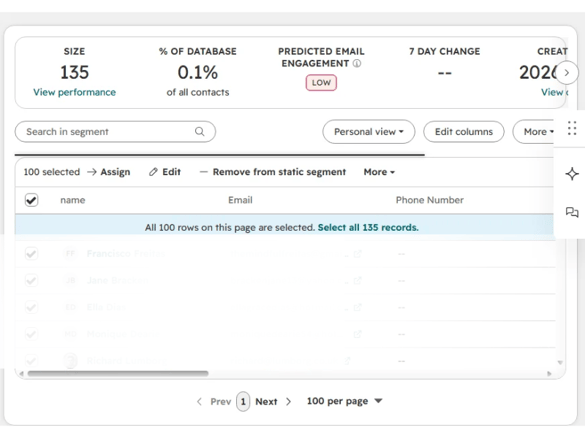
Select all contacts in the list, HubSpot only selects 100 contacts at a time so, you will need to click on 'Select all ### records'.
-
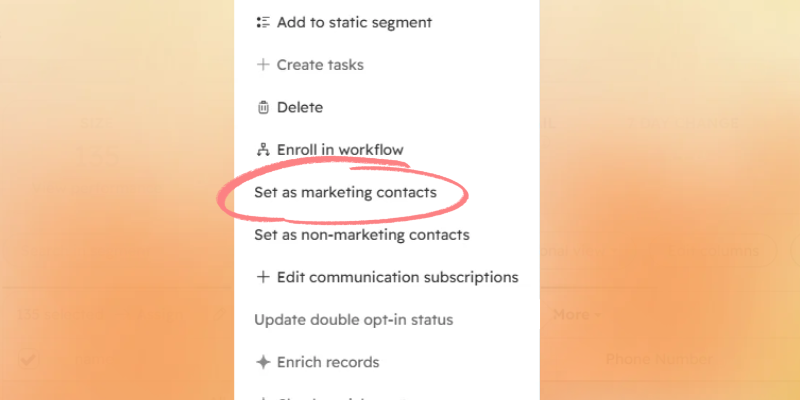
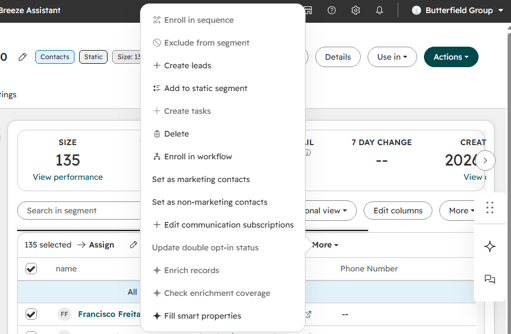
Click on more. Select 'Set as marketing contacts'.
-
Allow HubSpot to process the updates.
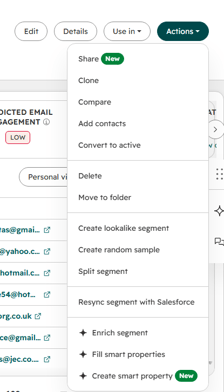
- You can now delete this segment. Navigate to Actions and then delete.
Step 3: Complete Your Final Recipient Review
Before sending, return to the email review section and confirm the following:
-
The correct segment has been selected.
-
Eligible contacts have been set as Marketing Contacts.
-
Hard-bounced and Unsubcribed contact email addresses have not been reintroduced into the sending audience.
If anything looks unusual, pause the send and message me on Teams. We can walk through the final review together.
Our goal is not simply to turn every contact in a segment into a Marketing Contact. Our goal is to ensure that the right contacts are Marketing Contacts and that we are sending to a clean, appropriate and eligible audience. ✨